
When Does Your Wrapp Subscription Renew: In the App and Through the API
The renewal date sits in Settings, under «Πλάνο Συνδρομής» (Pricing Plan), as «Επόμενη Πληρωμή» (Next Payment), together with the amount. If you connect through the API, GET /api/v1/tenant_details returns the same date in the next_payment_date field.
Your Wrapp subscription renews automatically: on the renewal date your card is charged and you carry on without a break. To know when that happens there are two routes, depending on how you work with Wrapp: the screen in the app, or the API.
In the app
Step 1: Open Settings
Select the person icon at the top right, then Ρυθμίσεις, Settings.
Step 2: Go to «Πλάνο Συνδρομής»
From the left-hand menu choose «Πλάνο Συνδρομής», shown as Pricing Plan in the English interface. The card that appears shows your package and the state of your subscription.
Step 3: Read «Επόμενη Πληρωμή»
The «Επόμενη Πληρωμή» (Next Payment) line shows the amount and the date of the next charge, for example «Επόμενη Πληρωμή: €… στις 01-03-2027». That date is the day your subscription renews. The amount includes VAT and any discount.
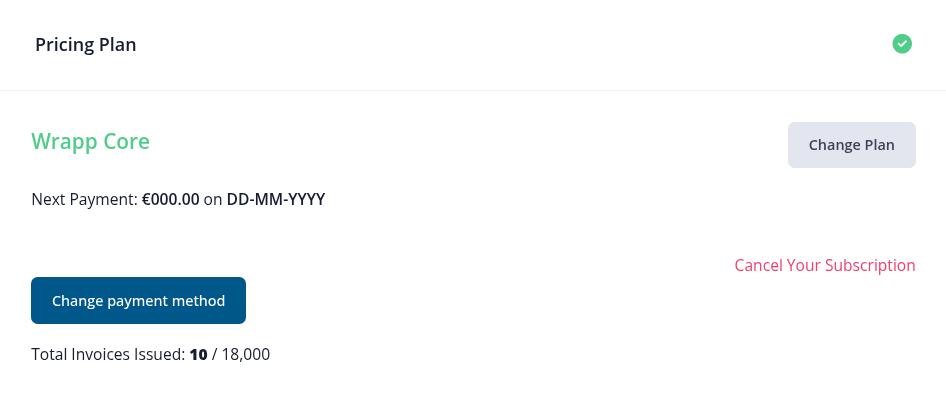
What the card is telling you
| On the card you see | What it means |
|---|---|
| A green tick and «Επόμενη Πληρωμή» (Next Payment) | The subscription is active and renews automatically on the date shown. |
| A list of periods, e.g. free months and then your package | Each period has a start and an end date. Next Payment is the first charge after the free months. |
| «Η συνδρομή σου λήγει στις» (Your subscription ends on) | The subscription has been cancelled and will not renew. It stays active until that date, then the account moves to the free plan. |
| A red mark and «Διευθέτηση Πληρωμής» (Proceed to Payment) | The last charge did not go through. Select it to complete the payment before the subscription is stopped. |
Want to change card before the renewal? The same screen has «Αλλαγή τρόπου πληρωμής», Change payment method. The new card is charged from the next payment on.
If «Πλάνο Συνδρομής» does not appear at all, you are signed in as a user who is not the main user of the account. Only the main user sees and manages the subscription.
Through the API
If your software talks to Wrapp through the API, the same information comes back in one call. First
log in with POST /api/v1/login to get a JWT. Then call
GET /api/v1/tenant_details with that JWT.
curl -L 'https://wrapp.ai/api/v1/tenant_details' \
  -H 'Content-Type: application/json' \
  -H 'Authorization: Bearer JWT'
From the response, these are the fields that matter for the renewal. In the example the package and the amount are not real values: the response carries your own package and your own amount. Package prices are on the plans page.
{
  "plan_name": "<your package>",
  "next_payment_date": "2027-03-01",
  "next_payment_amount": <amount with VAT>,
  "billing": {
    "status": "active",
    "access_until": null,
    "pay_url": null
  }
}
| Field | What it tells you |
|---|---|
next_payment_date |
The day of the next charge, which is the renewal date, as YYYY-MM-DD. null when there is no active subscription or nothing will be charged again. |
next_payment_amount |
The amount of the next charge in euros, VAT and any discount included. null in the same cases. |
billing.status |
active paid up, overdue a payment is unpaid, cancelled cancelled and ending on access_until, ended the subscription ended, none never subscribed. |
billing.access_until |
For cancelled, the last paid day. For overdue, the day the subscription stops if the payment stays unpaid. |
billing.pay_url |
For overdue and ended, the payment or renewal link to give the user. It never expires and needs no login. |
How to read it
- If
next_payment_datehas a value, the subscription renews automatically on that day. - If it is
nullandbilling.statusiscancelled, the subscription does not renew and ends onbilling.access_until. - If
billing.statusisoverdueorended, show the userbilling.pay_url.
The renewal date does not change from one document to the next, so there is no need to call
tenant_details before every issue. Every field of the response is described in the
REST API documentation. If you do
not have an API key for testing yet, see how to get a
test API key on staging.
If you want to change something before the renewal
- For a bigger package, see how to upgrade your subscription.
- To stop future charges, see how to cancel your subscription.
- If the subscription has already expired, see how to renew it after it expires.
Packages and their prices are always up to date on the plans page.
Frequently asked questions
Where do I see when my subscription renews?
In Settings, under «Πλάνο Συνδρομής» (Pricing Plan). The «Επόμενη Πληρωμή» (Next Payment) line shows the amount and the date of the next charge, which is the renewal date.
Do I need to do anything for it to renew?
No. While the subscription is active, your card is charged automatically on the date the Next Payment line shows. To change card before the charge, use «Αλλαγή τρόπου πληρωμής» (Change payment method) on the same screen.
Does the next payment amount include VAT?
Yes. The amount you see, on the screen and in the API field next_payment_amount, includes VAT and any discount.
Instead of Next Payment I see «Η συνδρομή σου λήγει στις» (Your subscription ends on). What does it mean?
Your subscription has been cancelled and will not renew. It stays active until the date shown, then the account moves to the free plan. If you changed your mind, select «Επανεκκίνηση Συνδρομής» (Resume Your Subscription).
How do I get the renewal date through the API?
With GET /api/v1/tenant_details, using the JWT you get from /api/v1/login. next_payment_date gives the date as YYYY-MM-DD and next_payment_amount the amount. Both are null when there is no active subscription or nothing will be charged again.
next_payment_date is null. How do I know when the subscription ends?
Read billing.status in the same response. If it is cancelled, the subscription does not renew and billing.access_until is the last paid day. If it is none, the account never had a subscription.
Why can I not see «Πλάνο Συνδρομής» in Settings?
The subscription is managed by the main user of the account. If you sign in as a different user, ask the main user to check the date or share it with you.
Need help?
If you have a question about this topic or want to make sure everything is set up correctly, contact us and we will look at it together.