
Invoicing a Customer Outside the EU from Greece
The process is the same as invoicing a customer in Greece, with one difference: the country you pick when you add the customer. From there Wrapp recognises the transaction as a third-country sale on its own and transmits it to myDATA with the right classification.
A third country is any country outside the European Union. Issuing the document is no different from invoicing a customer in Greece. Exactly one thing changes, and it happens at the moment you add the customer.
Step 1: Set the customer country
On the new customer form, the first field of the General Information section is the
country, and it arrives preset to Greece. Change it to your customer country.
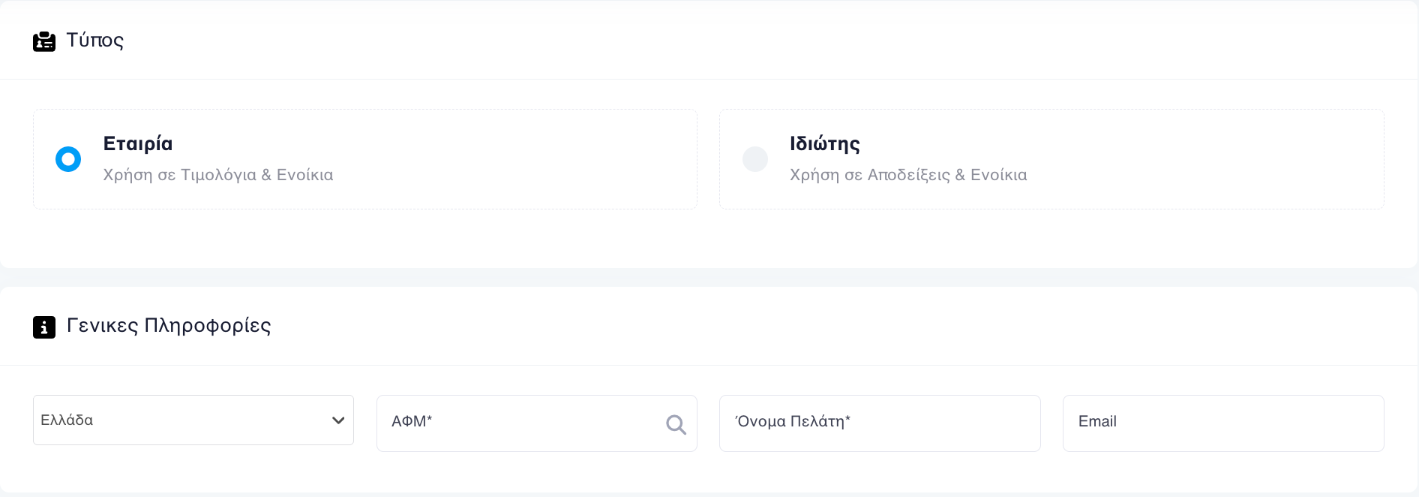
That is the whole of what distinguishes the transaction. You do not need to change any setting on your account to invoice a third country.
Step 2: Fill in the rest of the details
Carry on with the remaining fields using whatever details you have for the customer. A customer outside the EU has no intra-community VAT number to verify, so VAT-number lookup does not apply the way it does for domestic customers.
Step 3: Issue the document
From here you issue the document as usual. Once you press Submit, the system recognises from the country that this is a third-country transaction and transmits it to myDATA on issue with the matching classification. You do not have to select it yourself.
VAT and the reason for exemption
The VAT rate on transactions of this kind is 0%. Because you are issuing a document with zero VAT, the reason for the exemption has to be stated too: the article of the Greek VAT Code the zero rate rests on. You pick it from the list and it is transmitted to myDATA along with the document.
Which article applies depends on the transaction. Picking the right one is a tax decision, not an application setting: it differs depending on whether you are selling goods or supplying services. See the current list of VAT exemption articles and confirm the article with your accountant before you issue.
If your customer pays in pounds, dollars or another foreign currency, the document is issued as usual, with the amounts in euro and one extra payable line in their currency. See the guide to invoicing in a foreign currency and the exchange rate.
If your customer is in a country inside the EU, the transaction is not a third-country sale but an intra-community one, and it follows different rules. See the guide to intra-community invoicing.
Frequently asked questions
What counts as a third country?
Any country outside the European Union. If your customer is in an EU member state the transaction is intra-community and follows different rules.
Do I need to change a setting to invoice a third country?
No. Selecting the correct country on the customer record is enough. The system recognises the third-country transaction from that country and adjusts the myDATA classification when the document is issued.
What VAT rate applies on a third-country invoice?
The rate is 0%. Because you are issuing a document with zero VAT, you also have to state the reason for the exemption, which is the article of the Greek VAT Code the zero rate rests on.
Which VAT exemption article do I pick?
It depends on the transaction, so it is a decision to confirm with your accountant. You pick it from the exemption list once you set VAT to 0%, and the article is transmitted to myDATA together with the document.
Do I need the customer VAT number?
Fill in whatever customer details you have. A customer outside the EU has no intra-community VAT number to verify, so VAT-number lookup does not apply the way it does for domestic customers.
Need help?
If you have a question about this topic or want to make sure everything is set up correctly, contact us and we will look at it together.