
E-invoicing Provider Authorisation Failing on TaxisNet? Check Your AADE Contact Details
TaxisNet returns a generic error that names nothing and links nowhere. The most common cause is that your contact details at AADE have never been confirmed. Here is the fifteen-second check, and the fix.
When you connect Wrapp as your provider, the TaxisNet authorisation is granted in the first step of the process, using the TaxisNet credentials you enter in the application. When that step does not go through, TaxisNet returns a single generic error message: it does not say what is wrong, and it does not send you to the page that fixes it.
The most common cause has nothing to do with your provider or your credentials. It is that your contact details at AADE have never been confirmed. Checking costs fifteen seconds, so it goes first.
Step 1: Check whether your contact details are confirmed
Sign in to myAADE and open the
«Στοιχεία Επικοινωνίας» (Contact Details) page.
You can also reach it from the myAADE home screen, through the
Μητρώο & Επικοινωνία → Στοιχεία Επικοινωνίας tile.
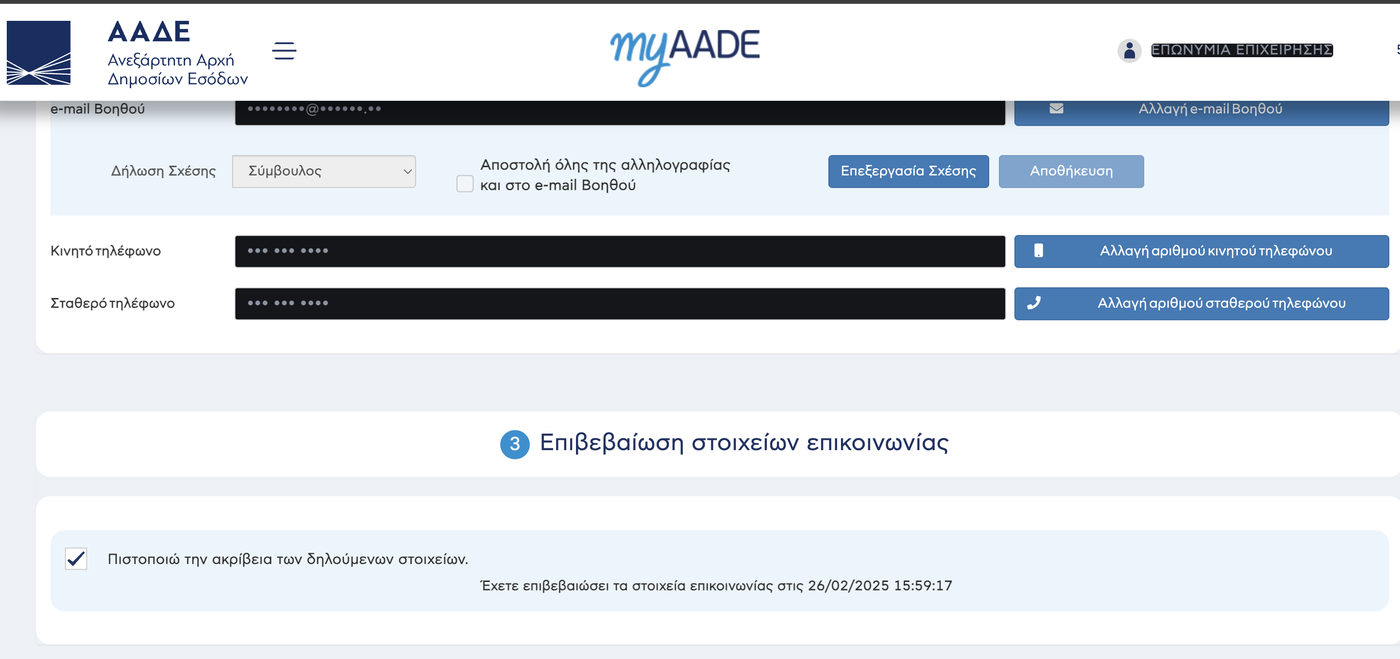
Scroll all the way down to Section 3, «Επιβεβαίωση στοιχείων επικοινωνίας». There is a checkbox there and, underneath it, one line telling you where you stand:
- If it reads «Έχετε επιβεβαιώσει τα στοιχεία επικοινωνίας στις» followed by a date and time, your details are fine. The error has another cause, so go to Step 3 and try the authorisation by hand.
- If there is no date, the confirmation has never been done. That is your problem.
Step 2: Confirm the details
On the same page, Section 2 shows your personal e-mail, your assistant e-mail, your mobile and your landline. If they are correct, change nothing. If something is wrong or missing, fix it first with the matching change button. The mobile number and both e-mail addresses are verified with a six-digit code that AADE sends you.
Then go back to Section 3, tick the «Πιστοποιώ την ακρίβεια των δηλούμενων στοιχείων» box (I certify that the declared details are accurate) and confirm. The screen prints the new date and time straight away.
Step 3: Grant the authorisation in TaxisNet again
With the details confirmed, the authorisation goes through. You can retry it from the application, or grant it directly in TaxisNet:
- Sign in to TaxisNet with your company credentials.
- Open Εξουσιοδοτήσεις (Authorisations), scroll to the «Παρόχους Ηλεκτρονικής Τιμολόγησης» section and press Νέα (New). That opens the «Νέα εξουσιοδότηση σε Πάροχο Ηλ. Τιμολόγησης» form.
-
In the
ΑΦΜfield enter the provider VAT number, not your own. For Wrapp it is 801361782. TheΣχόλιαcomments field is optional. - Press Καταχώρηση εξουσιοδότησης to submit.
If you are already signed in to TaxisNet, you can go straight to the
authorisation form.
If that link returns Error 404--Not Found, sign in to TaxisNet first and then follow
the menu path above.
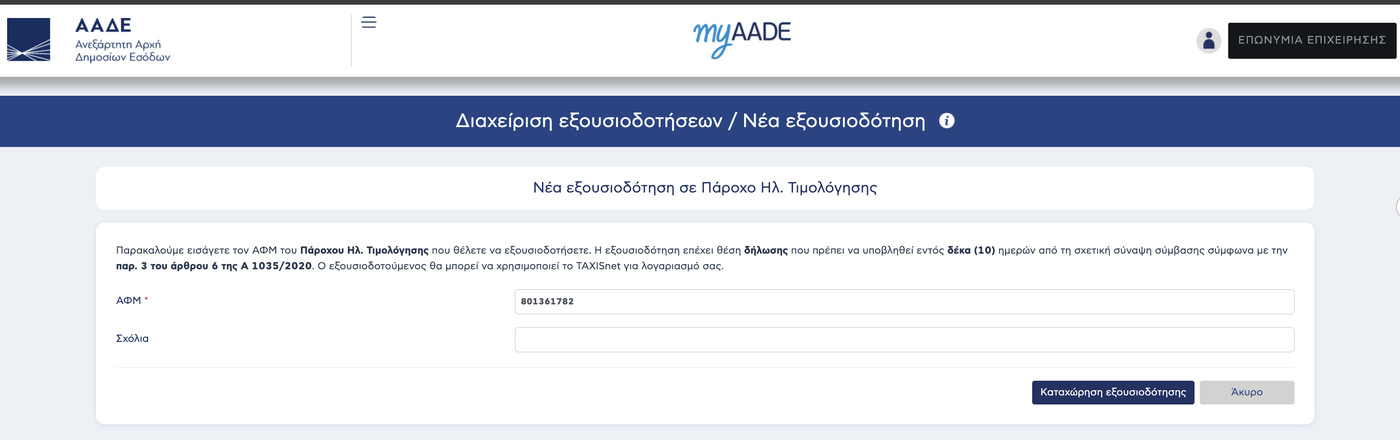
The AADE screen still refers to Α.1035/2020. The provision in force today for the declaration through a provider is article 6 of Α.1112/2025. The ten-day deadline is the same in both.
How you know it worked
Open Εξουσιοδοτήσεις from the TaxisNet menu again, that is Διαχείριση εξουσιοδοτήσεων (Manage authorisations), and scroll to the «Παρόχους Ηλεκτρονικής Τιμολόγησης» section. You will see one row carrying the provider name and VAT number, status Ενεργή (active), and the date you granted it. Revocation, if you ever need it, happens from that same row.
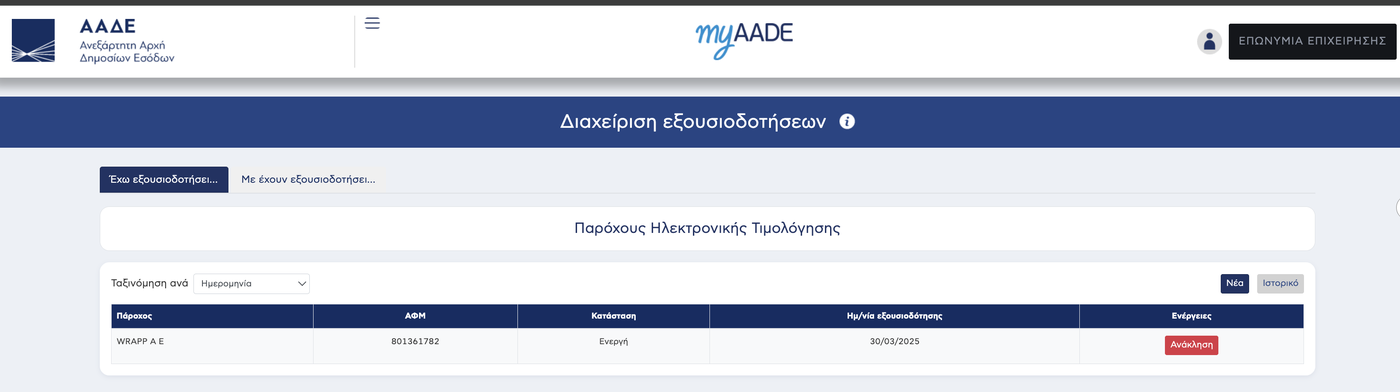
What stays with you and what does not: the authorisation is the half that falls to you. Accepting it from the provider side and filing the declaration itself with AADE are done by Wrapp. The authorisation does, however, count as the declaration, and it is due within ten days of signing the contract, under article 6 of A.1112/2025. That clock runs while the authorisation keeps failing.
For the whole process from the start, see how to file the YPAHES provider declaration. For who files it and what happens if you already had an older one, see who files the provider declaration on myDATA. If you also invoice the public sector you need the B2G provider declaration as well, and for the wider picture see mandatory e-invoicing from 2/11/2026.
Frequently asked questions
Why does TaxisNet not tell me what is wrong?
The authorisation screen returns a single generic error message. It does not distinguish between causes and it offers no link to the page that resolves it. That is why the contact details check comes first: it costs fifteen seconds and it covers the most common cause.
How do I know whether my contact details are already confirmed?
Section 3 of the «Στοιχεία Επικοινωνίας» page in myAADE. If they are confirmed, the screen prints «Έχετε επιβεβαιώσει τα στοιχεία επικοινωνίας στις» followed by a date and time. No date means it has never been done.
Which VAT number goes into the authorisation form?
The provider VAT number, not your own. For Wrapp it is 801361782. The form asks for that single field, plus an optional comment.
Do I need to change my details, or only confirm them?
If your email and phone numbers are correct, you change nothing. You tick the «Πιστοποιώ την ακρίβεια των δηλούμενων στοιχείων» box and confirm. If something is wrong, correct it first, then confirm.
I granted the authorisation by hand. Is there anything else to do?
No. The authorisation is the part that falls to you. Accepting it and filing the declaration with AADE are handled by Wrapp as your provider. All you need to see is the «Ενεργή» row in TaxisNet.
Is there a deadline?
Yes. The authorisation counts as the declaration itself and is due within ten days of signing the contract with your provider, under article 6 of A.1112/2025. That clock runs while the authorisation keeps failing.
Need help?
If you have a question about this topic or want to make sure everything is set up correctly, contact us and we will look at it together.