
How to Submit the B2G Provider Declaration
Declaring your YPAHES e-invoicing provider on myDATA takes five simple steps in Wrapp. All you need is your TaxisNet credentials.
Before you can issue invoices through a licensed e-invoicing provider (YPAHES), your relationship with that provider has to be declared on myDATA, the e-invoicing platform of AADE (the Greek tax authority). In Wrapp it starts inside the app and takes just a few minutes. Here are the steps.
Who files it: since 1/11/2025 the duty sits with the provider, under article 6 of Α.1112/2025. The declaration covers wholesale, retail and public contracts separately, so starting to invoice the public sector calls for an update. The full picture is in who files the myDATA provider declaration.
Step 1: Log in to your account
Log in to your account at wrapp.ai.
Step 2: Open Settings
From the top right of your screen, go to the Settings menu.

Step 3: Go to the YPAHES Provider Declaration
In the inner settings menu, select Integrations → YPAHES Provider Declaration. Several fields will appear on the right side of the screen. The green ones are already pre-filled.
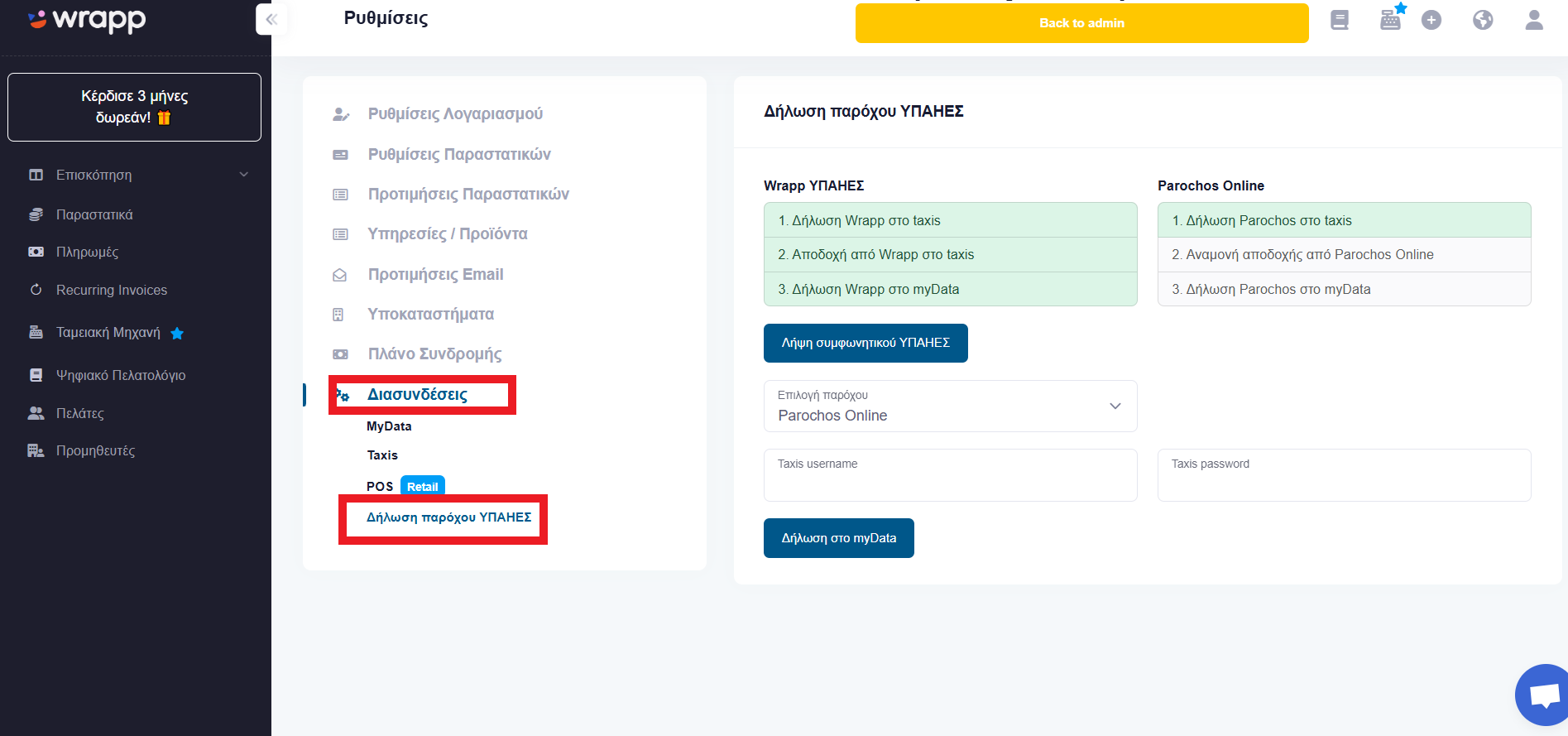
Step 4: Fill in your TaxisNet credentials
Fill in the empty fields with your TaxisNet credentials (the login you use for Greek government tax services).
Step 5: Click the myDATA declaration button
Click the Declare on myDATA button. If everything went well, the fields that were previously white will turn green, confirming that the process completed successfully.

Important reminder: Do not forget to forward the original contract you signed with your IT Solutions Provider to your accountant. By law, the contracting parties are required to file it with the competent tax office (DOY).
See also the full YPAHES provider declaration guide, the fields a public sector invoice has to carry and issuing a B2G invoice step by step.
Frequently asked questions
What is the YPAHES provider declaration?
It is a declaration on myDATA, the platform of AADE (the Greek tax authority), stating that your invoices are issued through a specific licensed e-invoicing provider. It is a prerequisite for transmitting invoices through the provider channel, including B2G invoices.
Who files the declaration with AADE?
The provider. Since 1/11/2025, under article 6 of Α.1112/2025, the provider files it through myAADE within ten days of the contract taking effect, and you have ten days to accept or reject it. The declaration covers wholesale, retail and public contracts separately, so starting to invoice the public sector calls for an update.
What do I need to submit the provider declaration in Wrapp?
Only your TaxisNet credentials, the login used for Greek government tax services. The remaining fields appear pre-filled in green on the YPAHES Provider Declaration screen, and Wrapp, as an AADE-certified provider, handles the rest.
How do I know the declaration was successful?
After you click the Declare on myDATA button, the fields that were white turn green. That confirms the declaration was registered successfully.
What should I do with the provider contract?
Forward the original contract you signed with your IT Solutions Provider to your accountant. By law, the contracting parties must file it with the competent Greek tax office (DOY).
Need help?
If you have a question about this topic or want to make sure everything is set up correctly, contact us and we will look at it together.