
Intra-Community Invoicing from Greece, With and Without VAT
In the normal case an intra-community invoice is issued at 0% VAT and all you do is pick the right country on the customer. There is also the case where Greek VAT has to be charged, and that one needs a setting you must switch back afterwards.
An intra-community transaction is one with a customer in another European Union member state. In the usual case you issue at 0% VAT and no setting is involved. There is also the case where Greek VAT has to be charged, and that one needs a change you must put back afterwards.
The normal case: intra-community at 0% VAT
Add the customer with their country selected instead of Greece, fill in the remaining details, and issue the document as usual. The system recognises the intra-community transaction from the country and transmits it to myDATA with the matching classification.
Because you are issuing with zero VAT, the reason for the exemption is stated too: the article of the Greek VAT Code it rests on. Which article applies depends on the transaction, so see the list of VAT exemption articles and confirm it with your accountant.
To verify the customer intra-community VAT number, VAT-number lookup runs against VIES, the EU database.
The exception: when Greek VAT has to be charged
Some intra-community transactions do not meet the conditions for the exemption and have to be invoiced with Greek VAT. Whether yours is one of them is a tax question, not an application setting: confirm it with your accountant before you go ahead.
To make the document reach myDATA carrying Greek VAT, go to
Settings → Invoice Preferences → Other Options and find the
«Αποστολή Παραστατικών στο myDATA» section. In its initial state both fields sit at
Προεπιλογή, the default.
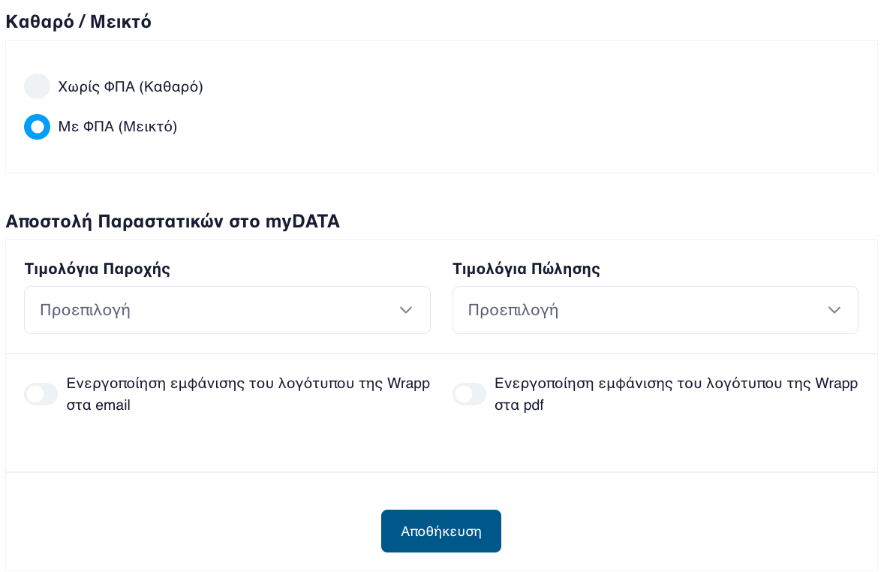
Change the field matching the document you are about to issue, service invoices or sales invoices, to «Ως Εσωτερικού», meaning as domestic, and save.
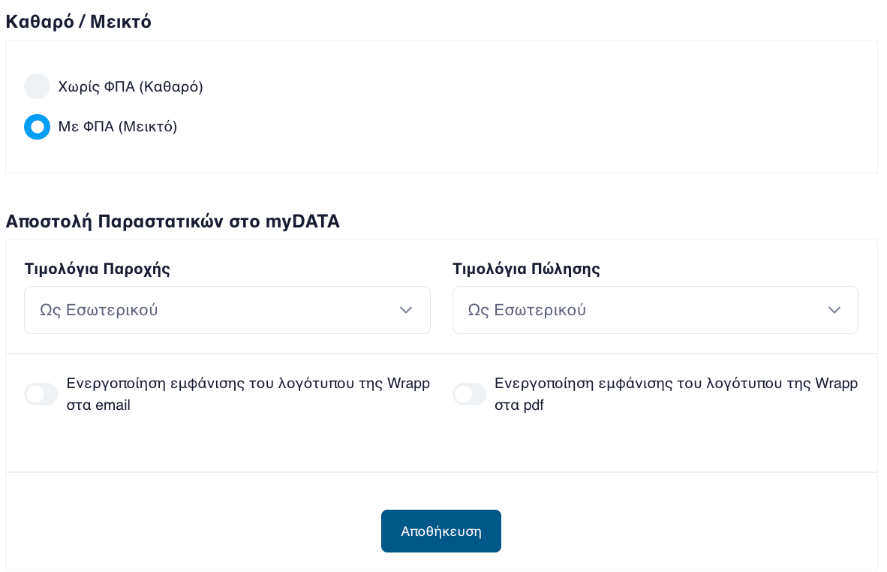
Issue the document you need.
Put the setting back as soon as you have issued. It is global, not per document. Left on, every intra-community invoice you issue afterwards goes to myDATA as a domestic transaction, with the wrong classification.
If your customer pays in a currency other than the euro, for example kroner or złoty, the document is issued as usual, with the amounts in euro and one extra payable line in their currency. See the guide to invoicing in a foreign currency and the exchange rate.
If your customer is outside the EU, the transaction is not intra-community. See the guide to invoicing a customer outside the EU.
Frequently asked questions
When is an intra-community invoice issued at 0% VAT?
In the usual case of a transaction with a business in another EU member state. Because you are issuing a document with zero VAT, the reason for the exemption is stated too, which is the article of the Greek VAT Code the zero rate rests on.
When do I charge Greek VAT to an EU customer?
When the particular transaction does not meet the conditions for the exemption. Which transactions those are is a tax question, so confirm it with your accountant before you issue.
What does the «Ως Εσωτερικού» option do?
It tells Wrapp to transmit the document to myDATA as though it were a domestic transaction, so it goes through carrying Greek VAT rather than the intra-community classification.
Why do I have to switch the setting back after issuing?
Because it is a global setting, not a per-document one. Left on, every intra-community invoice you issue afterwards goes to myDATA with the wrong classification. Switch it back as soon as the document is issued.
Do I need to change a setting for an ordinary 0% intra-community invoice?
No. In the normal case you touch no settings at all: pick the customer country and issue. The setting exists only for the exception, where Greek VAT has to be charged.
Need help?
If you have a question about this topic or want to make sure everything is set up correctly, contact us and we will look at it together.