
How to Renew Your Subscription After It Expires
If your subscription has expired you will see it as soon as you sign in: a red banner appears with the link to renew. The process finishes in two steps, with your card details.
If your subscription has expired there is nothing to go looking for. The renewal message appears on its own as soon as you sign in, and the process takes two steps.
Step 1: Sign in to your account
After signing in, a red banner appears saying your subscription has expired and that to carry on using Wrapp you need to follow the link inside the message.
Select the link and you are taken to a new page.
Step 2: Complete the payment
Fill in your card details and confirm the payment. Once the charge goes through, the renewal is complete and you carry on using the service without interruption.
Your data is not lost while the subscription is expired. Your invoices and details stay in the account. What is limited is use of the service until the renewal completes.
If your card is declined
Try again from the same screen. If the charge keeps failing, change the payment method in Settings:
select the person icon in the top right, then
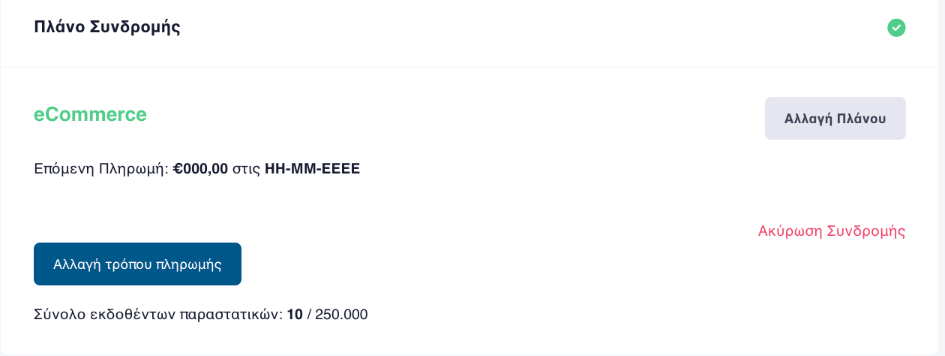
Settings → Subscription Plan and «Αλλαγή τρόπου πληρωμής», change
payment method.
If you want a different package
Renewing from the red banner continues the plan you already had. To change package, use «Αλλαγή Πλάνου», change plan, on the same screen, and see what is available on the plans page.
If instead you want to stop future charges, see how to cancel your subscription.
Frequently asked questions
Where do I find the renewal link?
It appears on its own as soon as you sign in, in a red banner at the top of the screen, saying your subscription has expired and offering a link to continue.
What happens to my invoices while the subscription is expired?
Your data stays in the account. What is limited is use of the service until the renewal is completed.
Can I change plan while renewing?
Changing plan happens in Settings, under Subscription Plan, using the change-plan option. Renewing from the red banner continues the plan you already had.
My card was declined. What now?
Try again from the same screen, or change the payment method in Settings under Subscription Plan. If the charge keeps failing, contact support.
Who can renew the subscription?
Plan and payment management sits with the account primary user. If you cannot see those options, your account does not carry that permission.
Need help?
If you have a question about this topic or want to make sure everything is set up correctly, contact us and we will look at it together.