
How to Cancel Your Subscription and Stop Automatic Renewals
Cancelling happens in Settings, in four steps. Your subscription is not cut off straight away: it stays active until the end of the period you have already paid for, and the account then moves to the free plan automatically.
If you want to stop future renewals of your subscription, cancelling happens in your account Settings. You do not lose access at that moment: below is exactly what happens and when.
Step 1: Open Settings
Sign in to your account and select the person icon in the top right corner of the page. From there choose Settings.
Step 2: Go to Subscription Plan
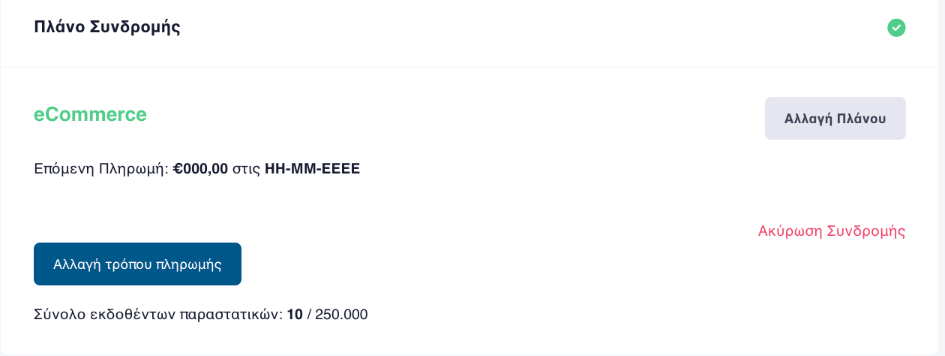
From the menu on the left choose Subscription Plan. It shows the package you are on, your next payment, and how many documents you have issued.
Step 3: Select cancel subscription
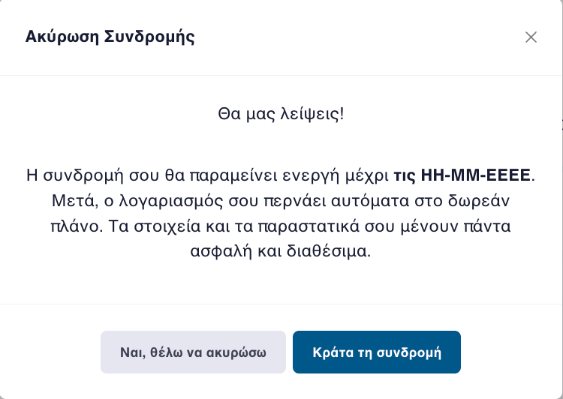
The «Ακύρωση Συνδρομής» link, meaning cancel subscription, sits on the right side of the card. It opens a confirmation dialog telling you exactly what will happen.
Step 4: Confirm
Press «Ναι, θέλω να ακυρώσω», yes I want to cancel, to complete it. If you have changed your mind, «Κράτα τη συνδρομή» closes the dialog without changing anything.
Your subscription is not cut off straight away. It stays active until the end of the period you have already paid for. After that your account moves to the free plan automatically: there is no separate downgrade step to perform.
Your data and invoices stay safe and available. Cancelling stops future charges, it does not delete your history.
If what you want is not a cancellation but a change of package, see step by step how to upgrade your subscription from «Αλλαγή Πλάνου», change plan, on the same screen. The available packages and their prices are on the plans page. If your subscription has already expired and you want to continue, see how to renew your subscription.
Frequently asked questions
Do I lose access immediately when I cancel?
No. Your subscription stays active until the end date of the period you have already paid for. After that the account moves to the free plan.
What happens to my invoices and data?
They stay safe and available. Cancelling stops future charges, it does not delete your history.
Do I need to downgrade the plan separately?
No. The move to the free plan happens automatically once the paid period ends. There is no second step to press.
Can I undo the cancellation?
The confirmation dialog offers a keep-my-subscription option if you change your mind before completing it. If you have already cancelled and want to continue, contact support.
Who can cancel the subscription?
Subscription plan management sits with the account primary user. If you cannot see the Subscription Plan section, your account does not carry that permission.
Need help?
If you have a question about this topic or want to make sure everything is set up correctly, contact us and we will look at it together.